AES/EBU Card
Overview
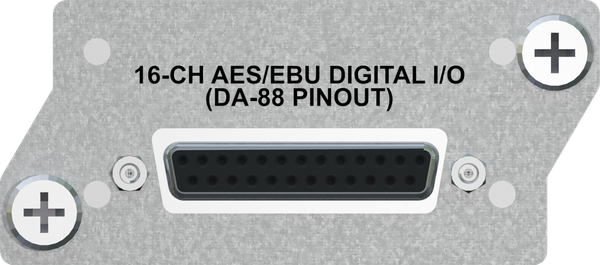
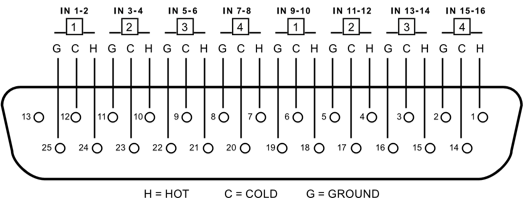
16 channels of audio are connected to the AES/EBU card using a Tascam DA-88 style pinout on a DB25 connector (see diagram below). This is the same pinout that standard analog DA-88 style connections use (like our Analog input card). There is one difference: Most manufacturers use the first 4 balanced pairs (the first 8 channels) for inputs and the last 4 balanced pairs (the last 8 channels) for outputs. Due to the amount of space available on the back of our card, we use just one DB25 connector to input (or output) all 16 channels. If you are interfacing with AES/EBU on another piece of equipment that uses a DB25 type connector, you will want to use that manufacturer's break-out cable, which splits out to individual XLR connectors first, then patch each of those XLR connectors to our cable. Using a DB25 to DB25 cable will not work (if you try it, you will likely get only 8 channels).
Advantages / Features
- Tascam DA-88-style pin-out on a DB-25 connector for inputting or outputting 16 channels of digital audio
- Jumper settings allow the user to choose whether the card is 16 inputs or 16 outputs
- Supports and automatically locks onto sampling rates of 44.1kHz, 48kHz, 88.2kHz, 96kHz, 176.4kHz, and 192kHz
- DB25 to (8) XLR (each AES/EBU XLR connector supports 2 channels of digital audio) break-out cable is sold separately, unless the AES/EBU card is purchased as part of the Hear Back PRO Four Pack
- (2) cards can be populated per Hub to allow A/B input switching between (2) banks of 16 channels with FW V2 or 32 simultaneous channels with all later firmware versions
- Up to (4) cards can be populated to allow A/B input/clock switching as well as dedicated AES/EBU outputs per Hub
Input and Output Settings
The following is applicable for V8 FW and later with PRO Connect.
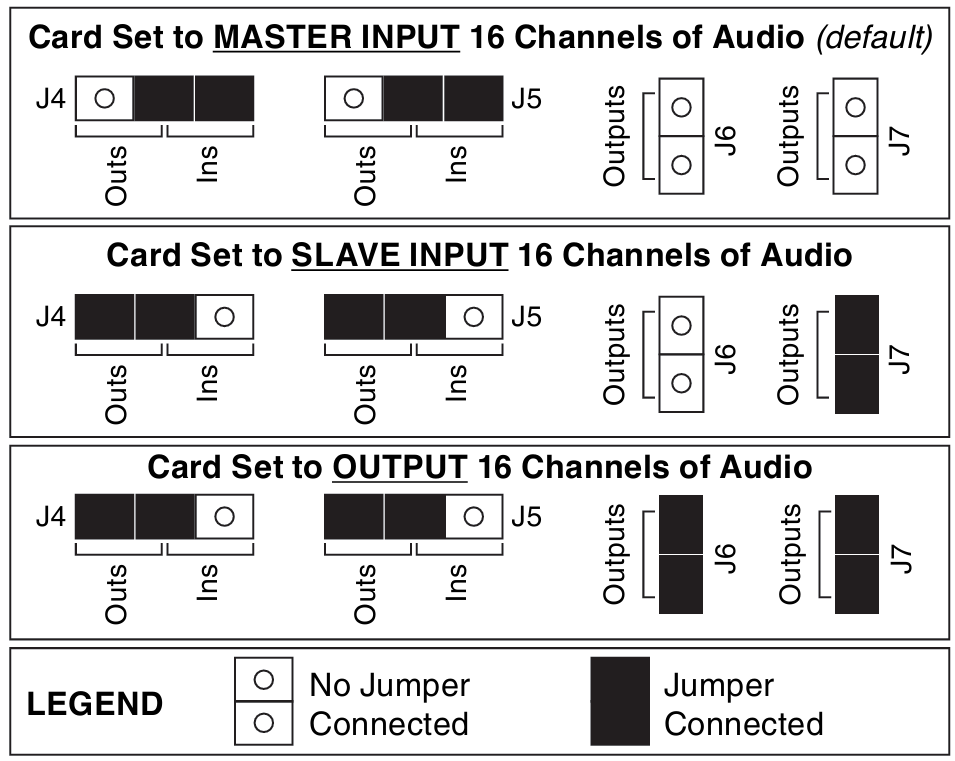
The AES/EBU card can either input 16 channels of balanced AES/EBU audio or it can output 16 channels of balanced AES/EBU audio depending on where the four jumpers – J4, J5, J6, and J7 – are set. These jumpers are located on the card, and they are set by default as inputs at the factory. See jumper settings diagram below for both input and output settings.
A second AES/EBU card can be added to Slot 3 of the same Hub. That card must be configured as a slave. Other AES/EBU cards in additional hubs will also need to be configured this way.
Master Input
When the card is used as an input, the first pair of channels (1/2) serve as the clock source for the system and must be connected to a valid AES/EBU source in order for the rest of the inputs to work. All inputs MUST run at the same sampling rate and MUST have their word-clocks synchronized to avoid digital pops and clicks. The AES Card will automatically change sampling rate to lock on to the incoming signal.
Slave Input
If multiple AES/EBU or other digital input cards are installed, only the card in the selected input slot can be set as "Master". All other cards must be configured as "Slave" to ensure audio synchronization and prevent pops and clicks.
Output
When the card is used as an output, the AES card will automatically change sampling rates to follow the sampling rate of the input source. Supported sampling rates are 44.1kHz, 48kHz, 88.2kHz, 96kHz, 176.4kHz, and 192kHz.
If operating at 176.4 or 192kHz sampling rates, a Word Clock Card is recommended to prevent pops and clicks.
Cabling
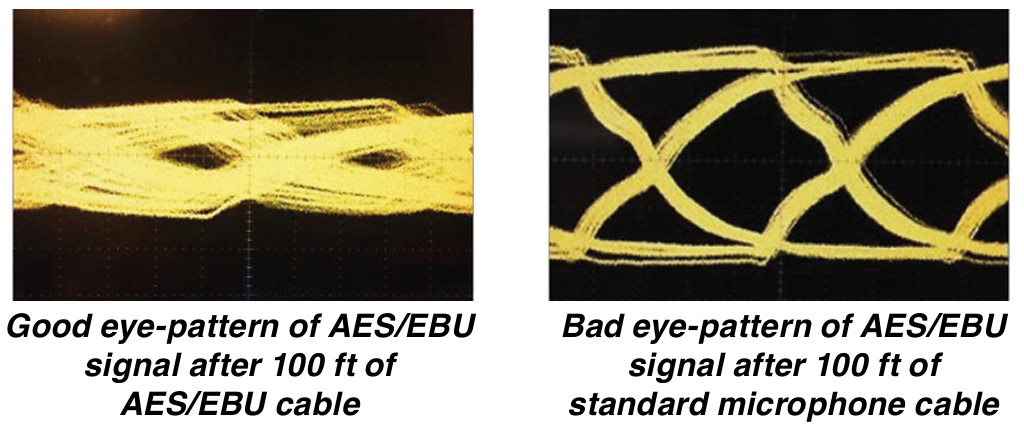
Standard microphone cable is not recommended for transmission of the AES/EBU signal. Digital-grade 110Ω AES/EBU cable such as West Penn DA2401 is recommended. Below is a diagram of a good eye pattern of the AES/EBU signal using 100 feet of the correct AES/EBU grade cable and also a bad eye pattern of the AES/EBU signal using 100 feet of standard microphone cable. Not only does the bad eye pattern look chaotic, it simply does not work. A good eye pattern equals good results!
The maximum distance you can run AES/EBU on a good quality digital-grade 110Ω cable is a function of the maximum sampling rate that you wish you support. See the table below.
| Sampling Rate | Maximum 110 Ω digital grade AES/EBU cable distance |
|---|---|
| 44.1 kHz | 475 feet |
| 48 kHz | 475 feet |
| 88.2 kHz | 275 feet |
| 96 kHz | 275 feet |
| 176.4 kHz | 175 feet |
| 192 kHz | 175 feet |