MADI Card
Overview
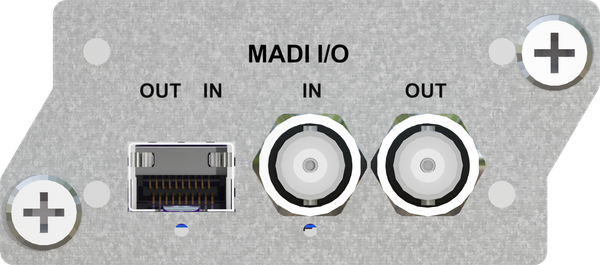
The MADI Input/Output Card provides an established, professional audio industry-standard method for sending and receiving digital audio. It simultaneously transmits and receives 32 channels with use of the Hear Back PRO system or 64 channels with use of the WSG Bridge.
The MADI Card provides the ability to connect MADI-based audio equipment to a Hear Back PRO Hub for personal monitor mixing or to the WSG Bridge as a conduit for Waves plugins and a bridge between MADI and the Waves SoundGrid or Dante protocols for multi-channel interfacing.
Advantages / Features
- Compatible with Hear Back PRO Hub and WSG Bridge
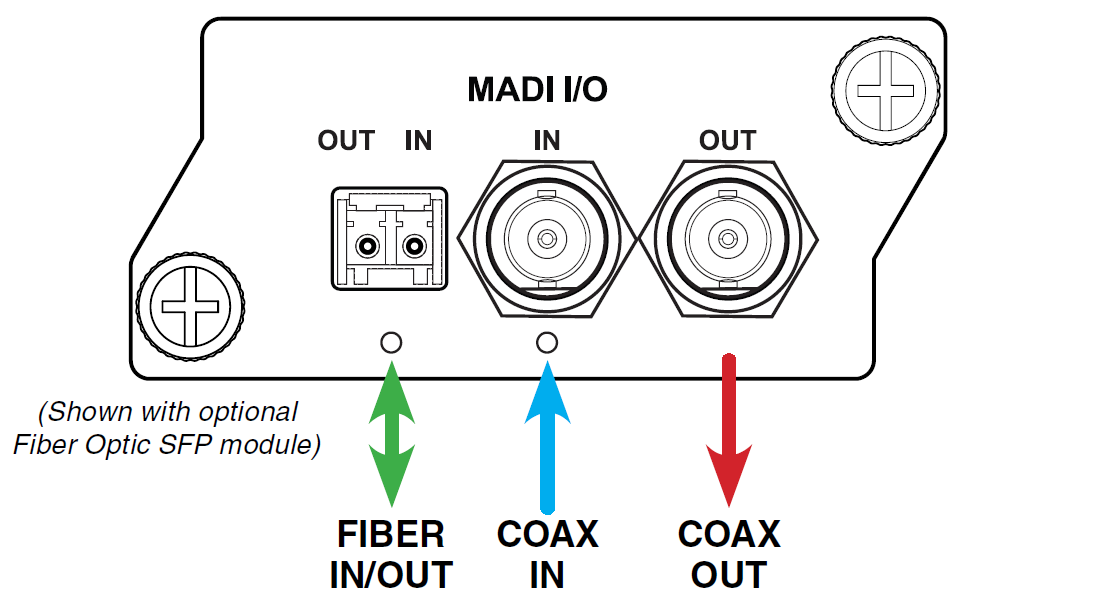
- Coax connections for Input and Output
- Optional Fiber Optic connections for Input and Output
- Supports 44.1kHz, 48kHz, 88.2kHz, 96kHz, 176.4kHz, and192kHz sampling rates:
- Supports 56-channel and 64-channel framing
- For sampling rates 88.2kHz and 96kHz: Both 48k (SMUX)and true 96k framing standards supported
- For sampling rates 176.4kHz and 192kHz: Both 48k(SMUX) and true 192k framing standards supported
- All MADI Card transmissions are non-SMUX
An optional Fiber Optic SFP Module (SFPFX) is available as a 100Base-FX Multi-Mode LC Fiber Module, 1300nm. If using the Fiber Optic SFP Module, both the Fiber Optic and the Coax outputs are active at the same time, however the Fiber Optic input takes priority over the Coax input. You can use both inputs as a redundant connection and the MADI card will seamlessly switch over from one to the other in the event of a failure.
When purchasing an SFP module, ensure it is 100Base-FX, 1300nm multi-mode. Follow the same instructions for installing the MADI card to install the Fiber Optic SFP module. When not in use, plug the fiber optic module to prevent dust accumulation.
If equipment is sending MADI to the card at 96k or 192k frames (or normal double or quadruple rate), the MADI card will automatically adjust – no action is required from user.
If using a separate word clock to synchronize MADI from another device, we offer a Word Clock card.
Card Slot Compatibility
The MADI Card requires the latest firmware versions installed on the PRO Hub or WSG Bridge prior to installation. FW update is available at: www.HearTechnologies.com > Support
Hear Back PRO
With firmware 6.6 and later, the HB PRO Hub can house two 32-channel cards; however, only one card at a time can be used – selected with the A/B switch. The MADI Card may be installed in Slot 1 or Slot 3 on the PRO Hub.
WSG Bridge
Available slots for installing the MADI Card on the WSG Bridge are Slot 1 or Slot 3.
MADI Input Status Indicator
Located below each input connector is a status LED. Either the SFP or the Coax will be lit depending on which input is currently selected by the automatic switch. The automatic switch selects the SFP module when a fiber optic signal is detected. The color of the LED is "blue" if there is a valid MADI signal detected and "red" when there is not.
SMUX Configuration
If other audio equipment sending MADI uses SMUX – or a 48K frame double or quadruple rate – then the user must select the correct jumper on the MADI Card to determine the rate; otherwise, default is to decode as 48k.
Technical Specifications
Sampling Rates:
Supports 44.1kHz, 48kHz, 88.2kHz, 96kHz, 176.4kHz, and 192kHz
Coax BNC Connector:
runs up to 100 meters
Fiber LC Connector:
Operates on 1300nm standard MADI wavelength. Compatible with 62.5/125 micrometer and also 50/125 micrometer multimode fiber.
Cabling:
Coax cable (75-ohm cable only; RG-6 recommended)
Optional fiber optic cable (50/125 μm or 62.5/125 μm multimode type fiber with LC connectors at Hub end)